For Jellyfin, Emby and Plex, on Apple devices

Your library, on the air.

Aster plays your Jellyfin server like television. Tune into channels you build from your own shows, watch anime with its real openings, and open discs through their menus.

Free on the App Store for Apple TV, iPhone and iPad, as an Android download for phones, tablets and Android TV, and as betas for Windows and Linux. Mac and Google Play are coming soon. See what each one does.

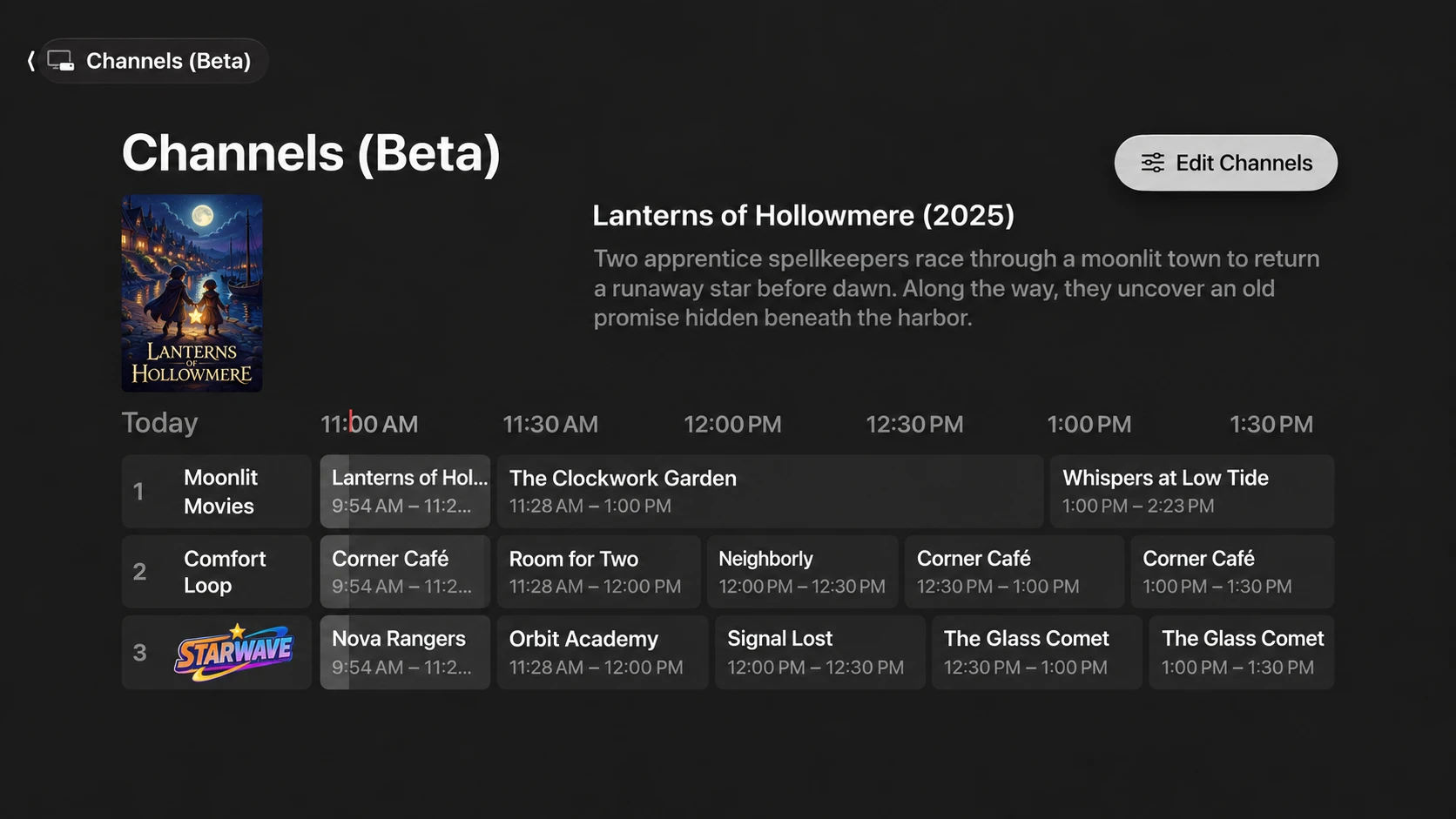
Aster's Channels guide on Apple TV. Three channels, Moonlit Movies, Comfort Loop and Starwave, are listed against times from 11:00 AM to 1:30 PM, with the current programme, Lanterns of Hollowmere, shown above with its poster and description, and an Edit Channels button.
The Channels guide in Aster for Apple TV. Channels AI-generated artwork. The shows pictured are fictional.

Features

The parts of TV you missed, built for your own server

Aster connects to the Jellyfin server you already run, or your Emby or Plex server. Your media stays where it is.

Channels

Pseudo live TV without a second server. Any Jellyfin playlist becomes a channel that's always on, with a guide, commercial breaks and channel surfing, all worked out by the app.

  • Nothing extra to host: just Jellyfin and Aster
  • Five ways to program a channel, from strict rotation to original air order
  • Your own commercials, promos, trailers and bumpers between shows

1 Moonlit Movies · now: Lanterns of Hollowmere · next: The Clockwork Garden

More about Channels

Anime openings and endings

The openings and endings are half of why you love the show. Aster plays each one with the episodes it aired with, alongside its full-length song and music video.

  • Matched to the right episodes, even when the opening changes mid-season
  • Song, artist and episode details filled in for you
  • Missing one? The server plugin can cut it from your own episodes

OP1 · Starfall · Lumina// · eps 1–12 · TV · Full · MV

More about anime themes

Disc menus

When you rip a disc, you lose its menu. Aster brings it back: Play Movie, Scene Selection and Special Features, with the art, music and transitions that made it feel like a release.

  • Menus link to the right film and its extras automatically
  • Install menus other people have made with one click
  • Build your own with a live-preview editor

Ember Crown · Play Feature · Chapters · Disc Extras

More about disc menus

Made for Jellyfin

Sign in to the Jellyfin server you already run and pick up where you left off. Your libraries, users, watch progress and parental controls all come from Jellyfin, so Aster fits into the setup you have instead of replacing it. Running Emby or Plex? Aster works with them too, with most features, and more will be added in later releases.

https://jellyfin.example.com · Signed in as you

See the home screen

Channels and anime openings work with Jellyfin alone, and the free Anime OP/ED plugin makes the openings even better. Disc menus use a free companion plugin on your Jellyfin server. Every feature is free.

Channels

Pseudo live TV, minus the extra server

No longer do you have to install a server on your server (Yo dawg, I got you a server for your server!) to have a pseudo live TV experience.

Aster's channels run on the Jellyfin server you already have. There's no second app to host and keep updated, no stream to transcode around the clock, and no tuner, M3U or XMLTV files to wire up. Pick a playlist, give it a channel number, and it's on the air.

Your playlists are the channels

A channel is a Jellyfin playlist with a few tags on it. That's the whole database: nothing to migrate, nothing extra to back up, and your channels move with your server.

Always already on

Aster works out the schedule from the clock, so switching to a channel drops you mid-show, like real TV. Every device in the house sees the same lineup at the same moment.

No plugin required

Create and edit channels right in the app. Prefer a keyboard? The free Channels plugin adds an editor to your Jellyfin dashboard, and you can remove it any time without losing a channel.

Program it like a network

Five ways to air
Shows take turns one episode at a time, run in blocks of a few episodes, shuffle into a fresh order each day, week or month, play the playlist straight through, or follow original air dates across every show.
Lineups that fill themselves
Pull in whole genres, networks, studios or collections, and new episodes join the channel as they arrive. Narrow it by library, year, age rating or running time, and give favourite shows extra airtime.
Commercial breaks
Bring back the ads, promos, trailers, interstitials and bumpers you grew up with. Choose how long each break runs and how often it comes around, and whether bumpers play going into the break, coming out of it, or both.
Shows that start on time
Line programmes up to the hour, half hour or any mark you like. Breaks stretch to fill the gap, so the next show starts right on the :00.
Looks the part
Channel logos in the guide, and an optional station logo in the corner of the screen. Pick its corner, size and transparency, and have it fade out after a while.
Channel surfing
A full guide shows what's on now and next. Or flip through channels over whatever you're watching, see how much of each show is left, and press Select to tune in.
Shuffle again
Bored of tonight's lineup? Deal a new one, and everyone watching that channel gets the change.
Channels for the right people
Keep a channel to certain users, like a kids' channel that only shows up on their profile, or share it with everyone on your server.
See the channel guide · See channel flipping

Anime openings & endings

Every opening, right where it aired

Skipping the opening is a crime. Aster gives every OP and ED the spotlight it deserves.

Drop your theme files into a folder on your Jellyfin server. The free Anime OP/ED plugin matches each one to its show, season and episodes and fills in the song and artist. Aster then plays it from the episode page, in its own music library, or as the full song and music video.

See it in action: anime openings and endings in Aster.

Matched to the episode

Each theme is tied to the episodes it actually aired with, so when a show changes openings halfway through a season, Aster changes with it. Works with Shokofin and with shows split into seasons.

TV size, full song or music video

Keep up to three versions of every theme: the 90-second TV cut, the full-length song and the official music video. Watch OP and Watch ED on any episode page, then switch to whichever version you're in the mood for.

Missing one? Cut it yourself

Aster can install a plugin on your Jellyfin server that clips missing openings and endings straight out of your own episodes, using their chapter markers. Every clip waits for your OK in the Jellyfin dashboard: approve it, reject it, or have it try a cleaner episode.

Your whole theme collection

Works without the plugin
No plugin on your server? Aster looks for opening and ending chapter markers in your episodes and makes its best guess, so Watch OP and Watch ED still work whenever it finds them. The plugin adds the song details, full versions, music videos and everything else here.
Song details, done for you
Titles, artists and episode ranges are filled in from AnimeThemes.moe. Prefer your own? Edit any theme in the plugin's editor in your Jellyfin dashboard, or put the details in the file name.
A real music library
Optionally publish your themes as Jellyfin libraries: one album of songs per show, plus every opening and ending as a music video. Search, shuffle, make playlists and favourite them like any other music.
Plays on every screen
Theme files often come as WebM or Ogg, which Apple devices can't play. The plugin makes a playable copy on your server automatically, so everything works on Apple TV, iPhone, iPad and Mac.
Spoiler-safe
Themes flagged as spoilers or NSFW are handled with care, and NSFW themes get an age rating so your parental controls apply to them too.
Bring files your way
Name them OP1, ED2, OP1-Full or OP1-MV, or keep AnimeThemes' own file names. Most video and audio formats work, from WebM and MKV to FLAC and MP3.
Upgrade any time
Found a creditless version of an opening? Swap the file in and rescan that show. Your old file is kept, never deleted.
A good neighbour
Lookups are batched and cached for two weeks to keep the load off AnimeThemes' community servers, and you can switch them off entirely.

Openings found from chapter markers work with any Jellyfin server. Everything else needs the free Anime OP/ED plugin on Jellyfin 12. Song details come from AnimeThemes.moe, a community project. Aster isn't affiliated with or endorsed by AnimeThemes.

See an episode page · See an opening card

Disc menus

The menu comes back

Ripping a disc keeps the movie and throws away the menu. Aster puts it back.

Remember the Play Movie, Scene Selection and Special Features screen that made a disc feel like a release? Disc menus recreate it for the films in your Jellyfin library, with backgrounds, music and transitions, and drive it all from your remote.

See it in action: a disc menu for Big Buck Bunny, the free open movie from the Blender Foundation.

Linked for you

A menu finds its film in your library by its TMDB or IMDb id, and links the extras by type and length. Drop the menu in and it's ready, with no file paths to fill in.

Made to be shared

A menu is a small file of layout and ids only: no file names, no server details, never code. Browse the community catalogue and install a menu with one click. Your library is never sent anywhere.

Build your own

Have the plugin draft a menu from a film's real extras and chapters, then refine it in the Menu Editor in your Jellyfin dashboard, with a live preview as you go.

Everything the disc did

Scene selection
Chapter menus are built from the film's own chapters, with thumbnails when Jellyfin has them.
Play All
Play the feature, any extra, or a whole run of extras in order, straight from the menu.
Backgrounds that move
Use the film's artwork, a TMDB backdrop, your own image, a flat colour, or the trailer looping behind the buttons, with a different look on every page.
Music and motion
Loop background music or the film's theme song, add button sounds, and fade, slide, zoom or wipe between pages.
Back to the menu
When the film or an extra ends, you land back on the menu, just like the disc.
Room for every extra
Long special features lists page themselves, with a More button when a submenu runs over.
Disc-style layouts
Place buttons anywhere on screen, layer banners and panels, and style the text to match the original release.
One menu, any app
Menus are plain, portable files built to an open format, so a menu made once can work in any Jellyfin app that supports it.

Disc menus need the free Aster Disc plugin (early alpha) on a Jellyfin 12 server. The plugin stores your menus and serves them to Aster.

See a disc menu

Screenshots

See it on the big screen

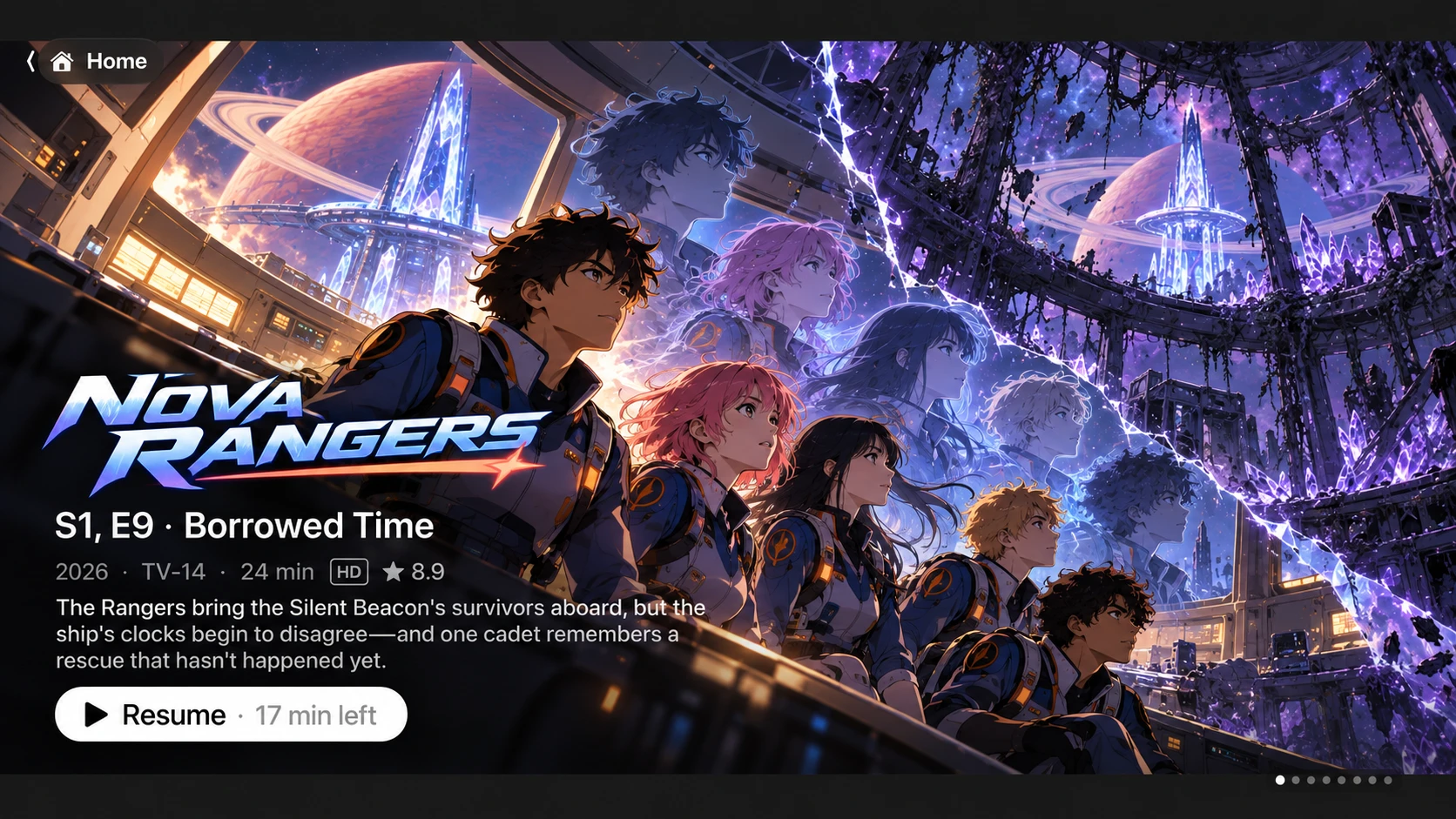
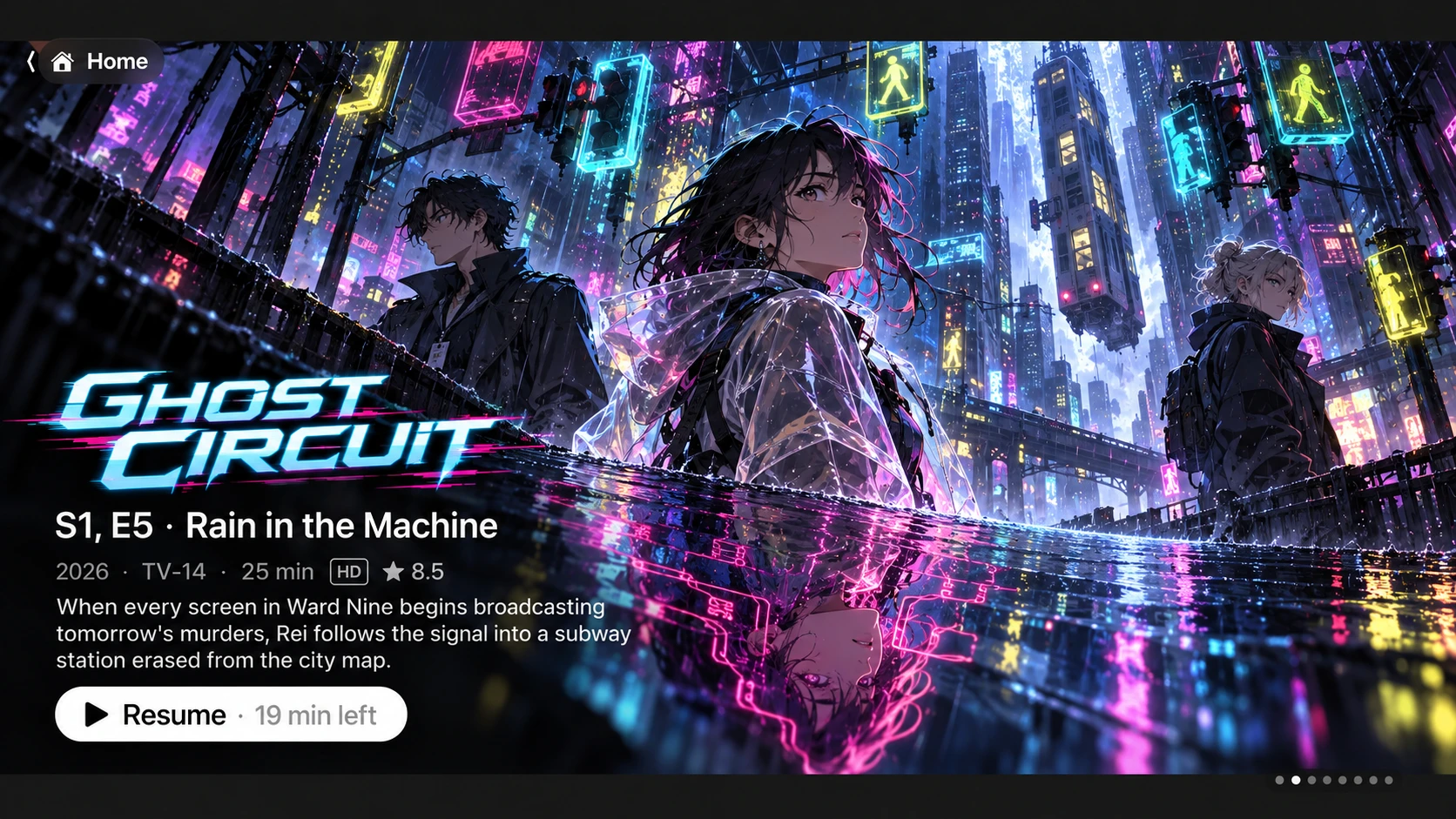
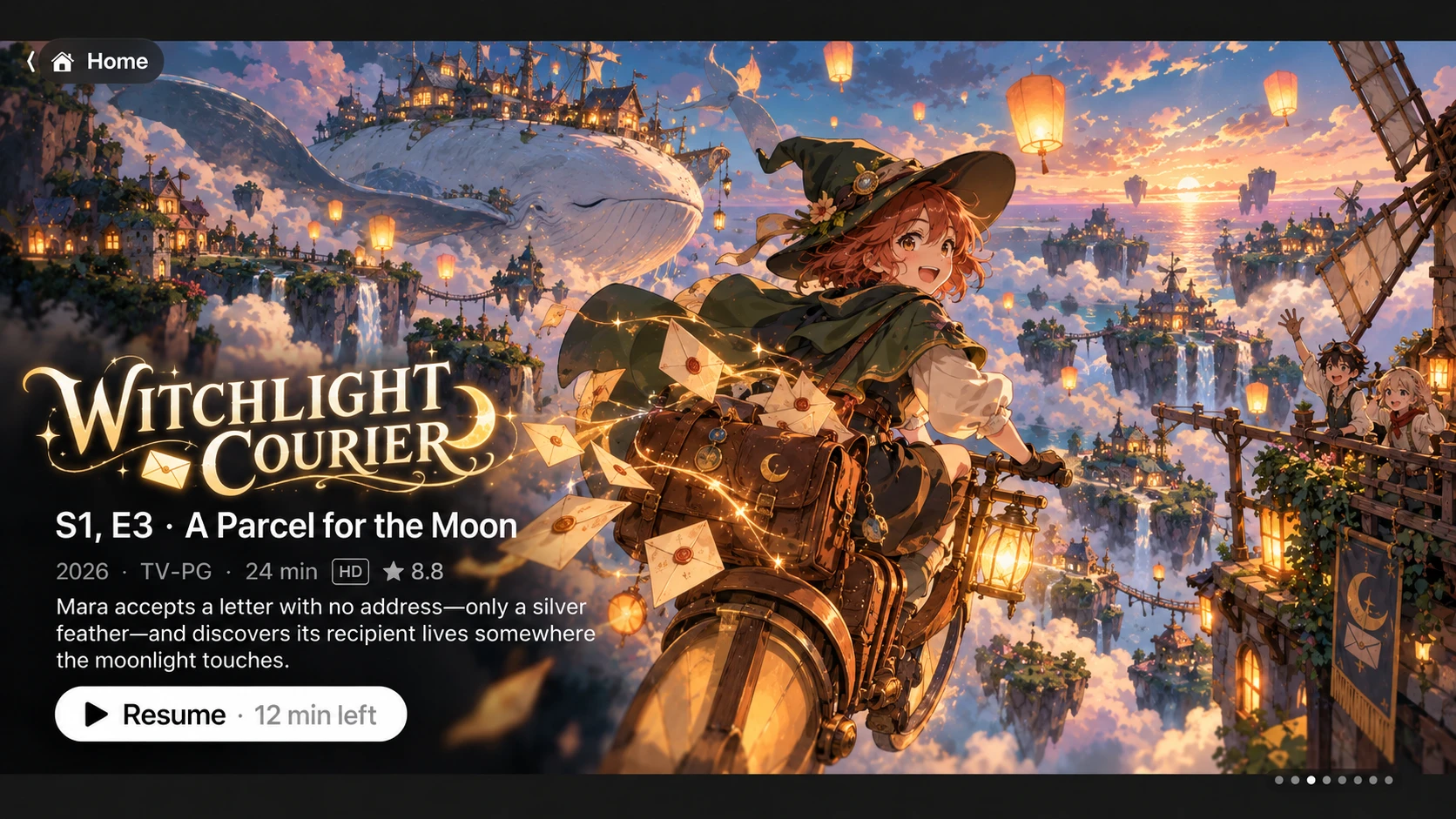
Home. Pick up where you left off. The home screen features the shows you're in the middle of, one after another, with full-screen artwork, the episode's details and a Resume button that tells you how much is left. AI-generated artwork. The shows pictured are fictional.
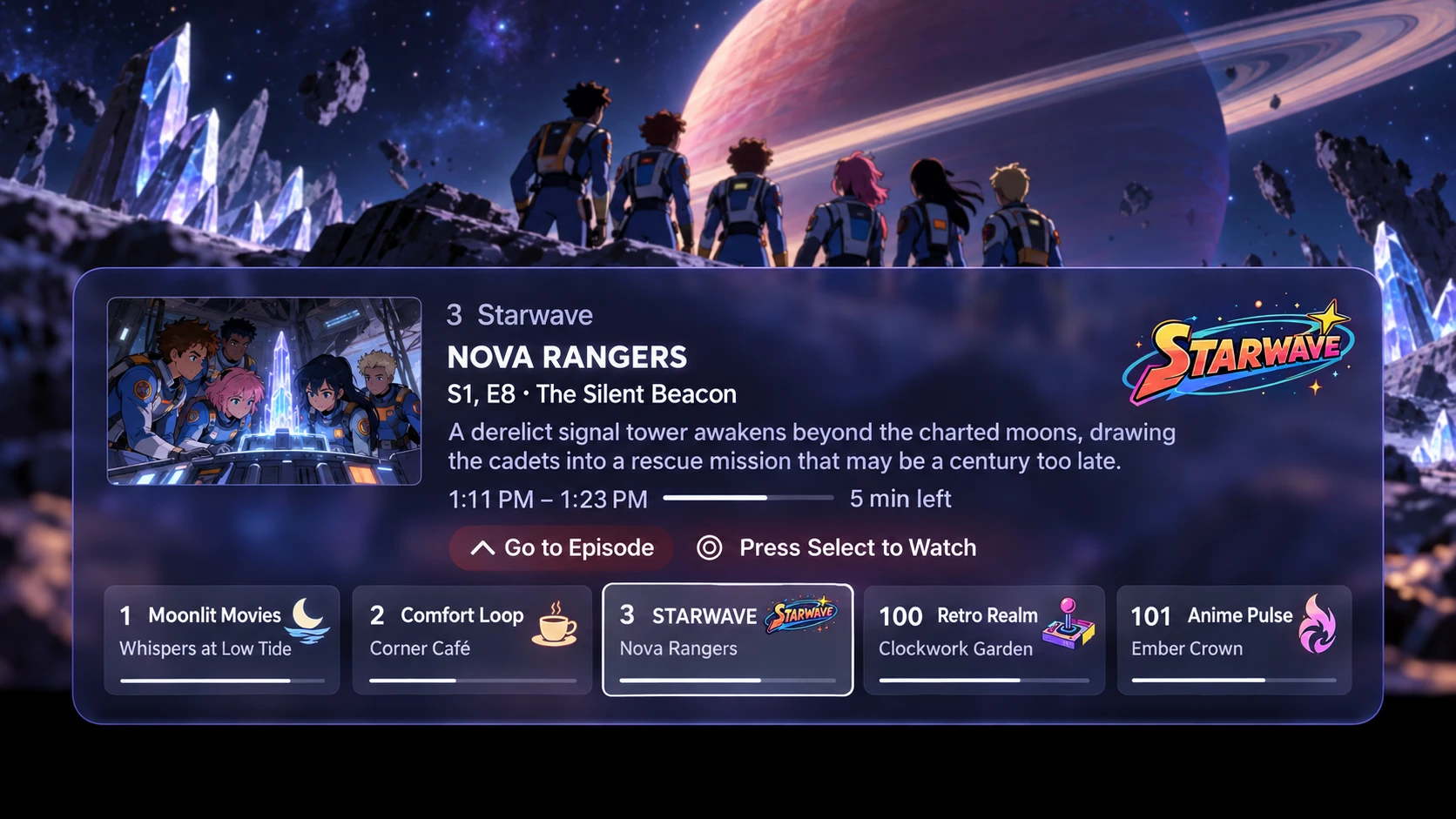
Aster's channel flipper over a playing show. The focused channel, 3 Starwave, shows Nova Rangers, season 1 episode 8, The Silent Beacon, from 1:11 to 1:23 PM with 5 minutes left, plus Go to Episode and Press Select to Watch. A row below lists channels 1, 2, 3, 100 and 101 with what each is playing and its progress.
Flip channels. Browse every channel without leaving what you're watching. Each one shows what's on and how far along it is. Press Select to tune in, or go straight to that episode in your library. Channels AI-generated artwork. The shows pictured are fictional.
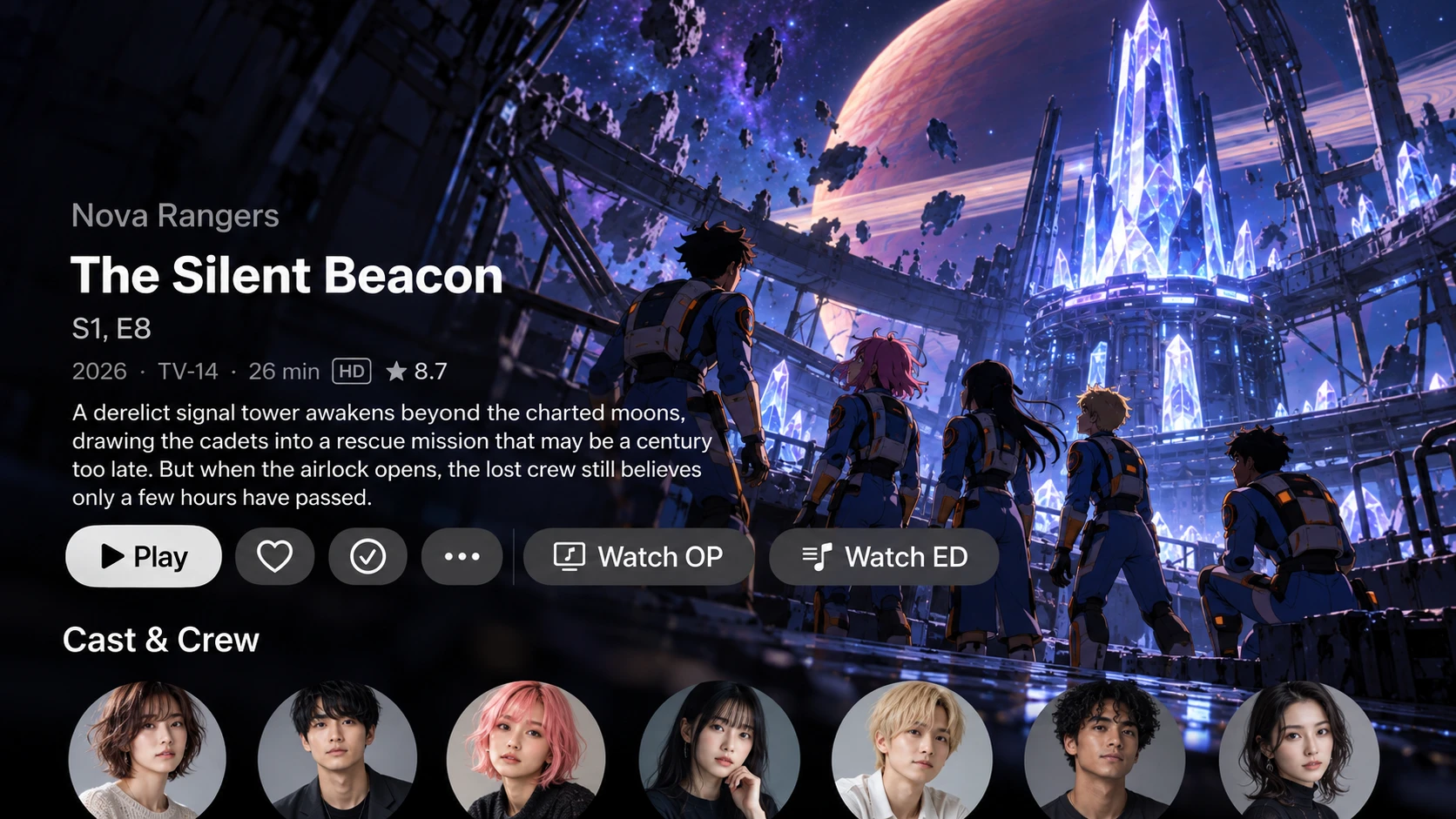
An episode page in Aster for Nova Rangers, season 1 episode 8, The Silent Beacon: 2026, TV-14, 26 minutes, HD, rated 8.7, with a description, buttons for Play, favourite, watched, more, Watch OP and Watch ED, and a Cast and Crew row.
Episode pages. Artwork, rating, runtime and cast at a glance. When a show has themes, Watch OP and Watch ED play that episode's opening or ending on their own. Watch OP/ED · Plugin optional AI-generated artwork. The shows pictured are fictional.
Aster on Apple TV playing an anime opening's music video. A card in the lower left reads: Opening 1, Starfall, by Lumina//, from Astral Circuit, episodes 1 to 12.
Opening cards. Every opening and ending plays with its song title, artist and episode range. Switch between the TV version, the full song and the official music video. Anime OP/ED plugin AI-generated artwork. The shows pictured are fictional.
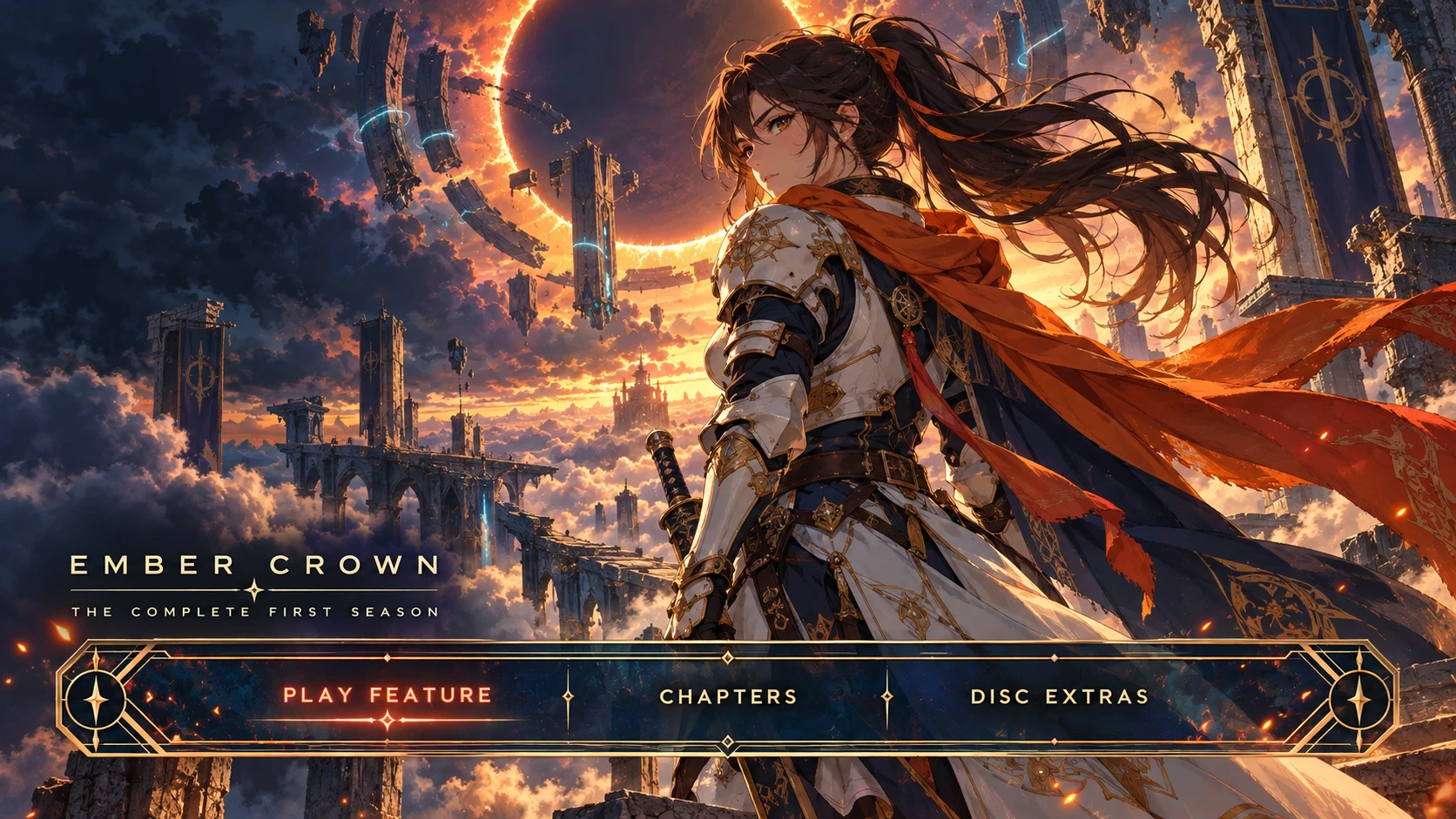
Aster on Apple TV showing a disc menu for Ember Crown, The Complete First Season, with Play Feature, Chapters and Disc Extras in an ornate gold menu bar.
Disc menus. Open a film or season the way the disc did, with its own menu art. Play the feature, jump to a chapter, or browse the extras. Disc menus plugin AI-generated artwork. The shows pictured are fictional.

Platforms

On the screens you watch

Apple TVAvailable
iPhone & iPadAvailable
AndroidPhones and tablets, Android 8.0 and later (APK)Available
Android TVSame APK as phones and tabletsAvailable
WindowsWindows 10 and later: installer or portable .zipBeta
Linuxx64 and ARM64: .deb, .rpm, Arch, FlatpakBeta
MacComing soon

Servers

JellyfinAvailable
EmbyMost features
PlexMost features

Emby and Plex have most features, and more will be added in later releases. Anime openings and disc menus are built for Jellyfin, and Channels work on Jellyfin and Plex (on Plex, with the Channel Builder). Compare every feature.

Privacy

Between you and your server

No account with us

You sign in to your own Jellyfin or Emby server. There is no Aster account to create.

No tracking

Aster has no analytics or advertising SDKs. What you watch is recorded only on your server.

Your media stays home

Video streams straight from your server to your device. Nothing passes through us.

Read the full privacy policy